
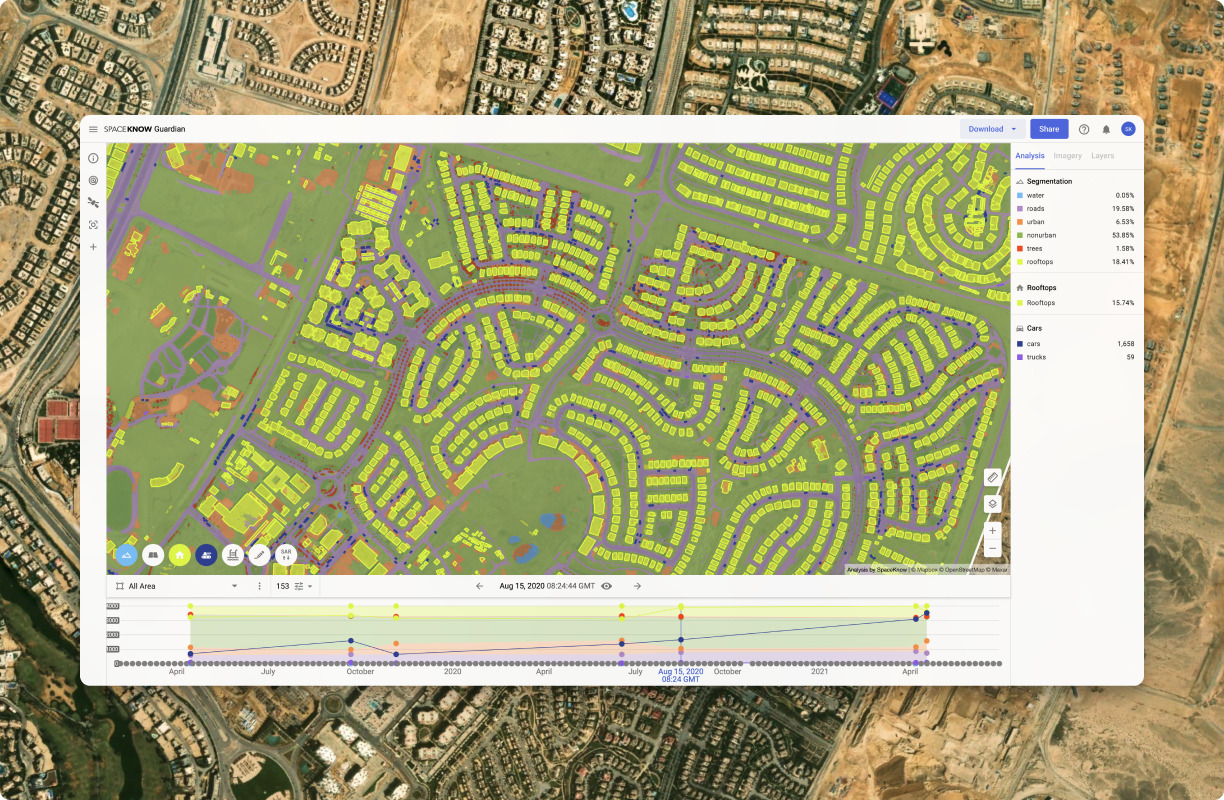
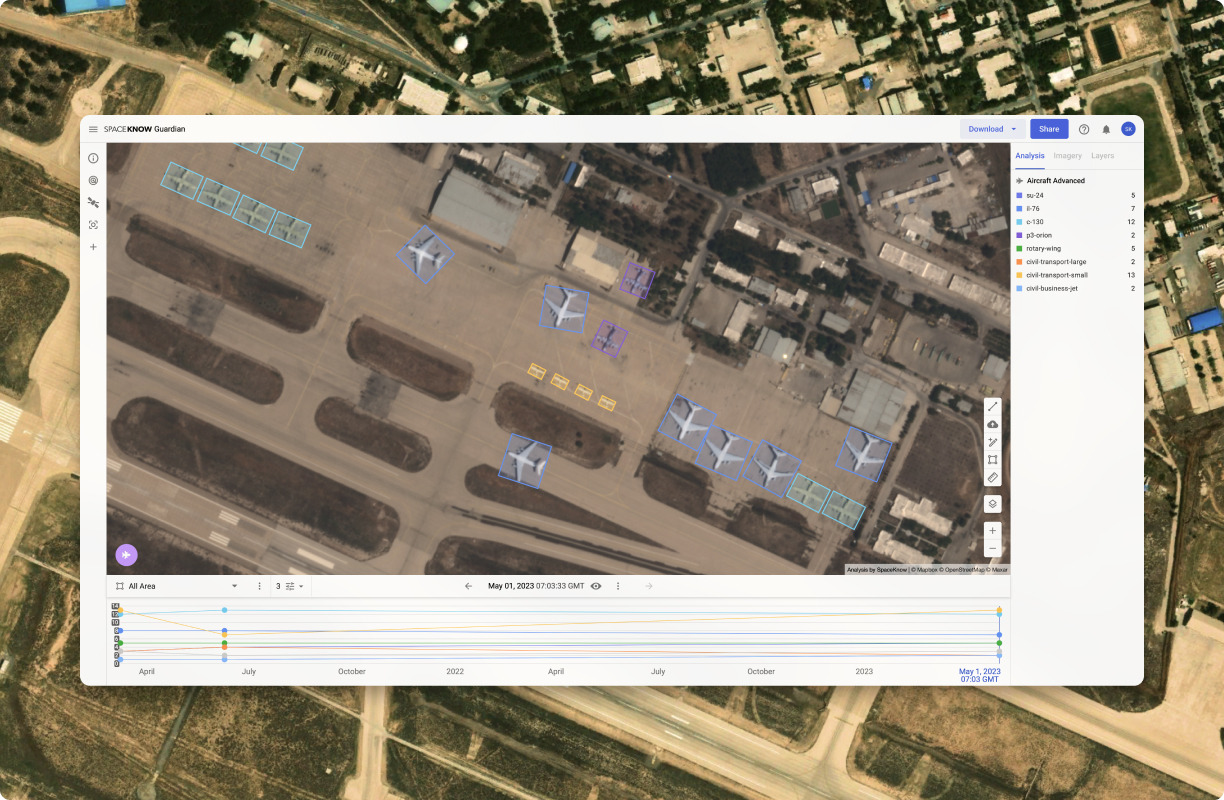
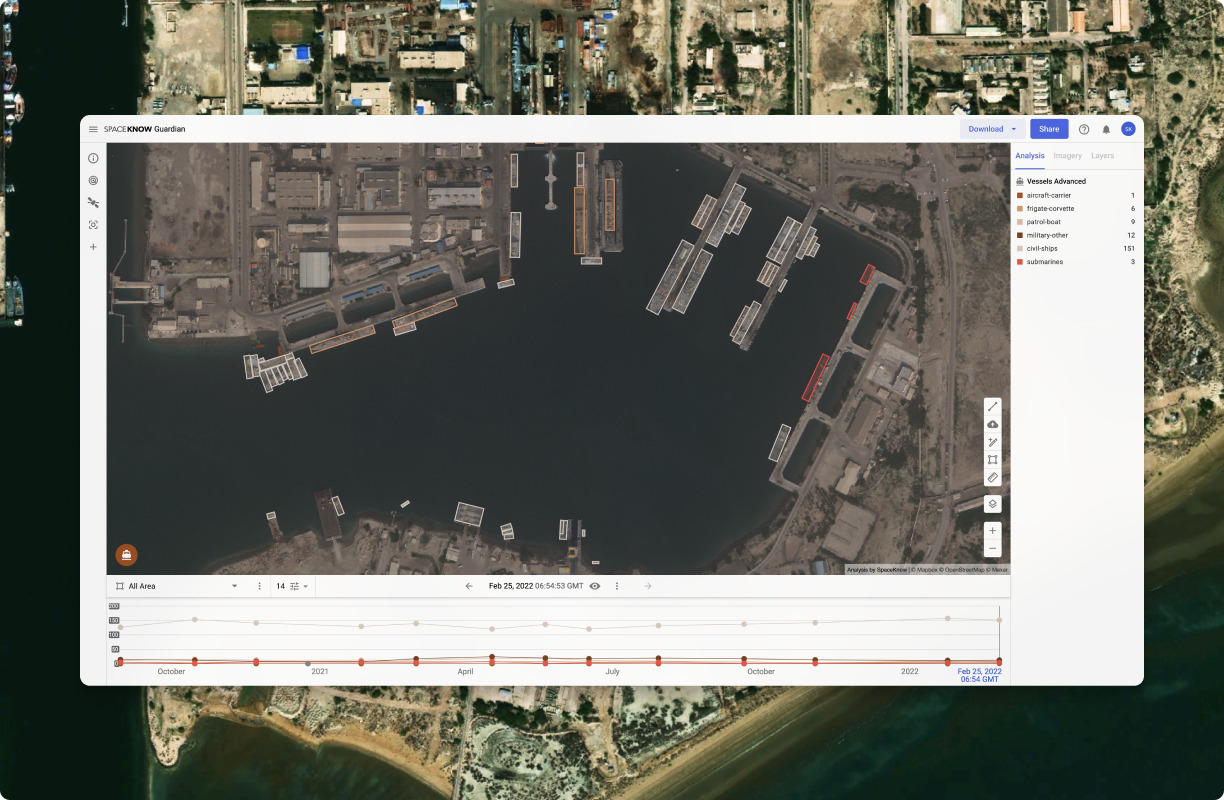
SpaceKnow provides global coverage of the earth through cutting edge technology giving you access to view specific locations and monitor trends in our
SpaceKnow is praised for its innovative use of satellite data to provide insights across various industries, notably in economic activity monitoring, environmental assessments, and global market analysis. The social mentions highlight its diverse applications, like methane emissions monitoring and economic forecasting in different countries. However, there are no explicit reviews mentioned in the data provided, so complaints and user pricing sentiment towards SpaceKnow are not accessible. Overall, SpaceKnow boasts a positive reputation, underscored by frequent mentions in high-profile media and continuous engagements with their innovative satellite-driven projects.
Mentions (30d)
16
Reviews
0
Platforms
3
Sentiment
11%
16 positive


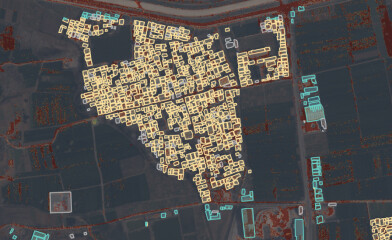
SpaceKnow is praised for its innovative use of satellite data to provide insights across various industries, notably in economic activity monitoring, environmental assessments, and global market analysis. The social mentions highlight its diverse applications, like methane emissions monitoring and economic forecasting in different countries. However, there are no explicit reviews mentioned in the data provided, so complaints and user pricing sentiment towards SpaceKnow are not accessible. Overall, SpaceKnow boasts a positive reputation, underscored by frequent mentions in high-profile media and continuous engagements with their innovative satellite-driven projects.
Features
Use Cases
Industry
information technology & services
Employees
37
Funding Stage
Series A
Total Funding
$9.2M
Converted Karpathy's coding skill from Pro to free plan. Here's the full thing:
The Karpathy coding skill is locked behind Pro. It doesn't use any Pro-only features, so I rewrote it for free plan chat workflows. Same philosophy, tuned for no terminal, no subagents, and a shorter context window where mistakes are expensive. Paste the whole thing into a Project's custom instructions or use it as a system prompt. It auto-triggers on any coding request. --- name: karpathy-coding description: Apply Karpathy-inspired coding discipline to any programming task. Use this skill whenever the user asks you to write, fix, refactor, extend, or review code — even casually ("can you add X", "why is this breaking", "clean this up"). Also trigger when the user pastes code and asks a question about it, when they describe a feature or bug, or when they use words like "implement", "build", "add", "fix", "change", or "improve" in a technical context. This skill is especially valuable on the free plan where mistakes are costly because regenerating and iterating burns the context window fast. compatibility: claude-code opencode --- # Karpathy Coding Guidelines Derived from Andrej Karpathy's observations on LLM coding pitfalls, adapted for chat-first workflows (no terminal, no subagents, limited context window). **Core tension:** These guidelines trade speed for correctness. For trivial one-liners, use judgment and skip the ceremony. --- ## Pre-flight: Before writing any code Run this checklist mentally before producing output. **1. Do I know what "done" looks like?** Convert vague requests to verifiable criteria before proceeding: | Vague | Verifiable | |---|---| | "fix the login bug" | "user can log in with correct password and gets rejected with wrong one" | | "make it faster" | "search returns results in under 200ms on typical query" | | "add validation" | "empty email raises ValueError; non-string input raises TypeError" | If you cannot state a verifiable criterion, ask for one before writing a single line. **2. Have I listed my assumptions?** State them explicitly at the top of your response: - "Assuming this runs in Python 3.10+." - "Assuming `db` is already an open connection object." - "Assuming you want this to overwrite, not append." If an assumption is load-bearing (wrong assumption = wrong code), ask rather than assume. **3. Are there multiple valid interpretations?** If "export user data" could mean a file download, an API response, or a background job — name all three and ask which one. Do not pick silently. **4. Is there a simpler approach?** Ask: "Can this be done in half the lines?" If yes, do that version first. --- ## The four principles ### 1. Think before coding - Name your assumptions before the code block, not after. - If you spot an ambiguity that will cause a rewrite, raise it now. - If the user's approach has a simpler alternative, say so: "This works, but you could also just do X in 3 lines. Want that instead?" - If you are genuinely uncertain how something in their codebase works, say so. Do not fill the gap with a plausible-sounding guess. **Format for assumptions:** Assumptions: X is a list of dicts, not objects This runs once at startup, not per request Error logging is not required yet If any of these are wrong, flag it before running this. ### 2. Simplicity first Write the minimum code that solves today's problem. Do not solve tomorrow's problem. - No classes where a function works. - No config system where a constant works. - No abstraction for code used in exactly one place. - No optional parameters "for future flexibility." **Example:** ```python # Asked: "calculate 10% discount" # Wrong: class DiscountStrategy(ABC): def calculate(self, amount: float) -> float: ... # Right: def discount(amount: float, pct: float) -> float: return amount * (pct / 100) ``` ### 3. Surgical changes Touch only what the request requires. Match the surrounding style exactly. When editing existing code: - Do not rename variables that were not part of the problem. - Do not add type hints if the existing code has none. - Do not change quote style, spacing, or comments unless they were the bug. - Do not add docstrings, logging, or error handling that was not asked for. **The diff test:** Every changed line should trace to a specific part of the user's request. ```diff # Bad (too much): - def process(data): + def process(data: list[dict]) -> list: + """Process user data.""" results = [] # Good (surgical): def process(data): results = [] for item in data: + if not item.get('id'): +
View original[offer]Looking for people in US/UK/CA/AU to film their everyday chores for AI robot training ($12/hr, up to $1,200)
Hey everyone, We're working with a US robotics company that's building humanoid household robots. To train the AI, they need a lot of first-person video of regular people doing regular chores — the boring stuff like washing dishes, folding laundry, wiping counters. Basically: a robot can't learn how to load a dishwasher unless it sees thousands of humans actually doing it. That's where you come in. You wear a lightweight head-mounted camera and just… do your normal chores while it records. No script, no acting, no editing. I know it sounds a little weird. It's also a totally legit, low-effort gig if you've got a normal home and some spare time. The basics: $12/hour, paid per completed session Up to 100 hours per person = up to $1,200 total Self-paced. Do it on your own schedule, in your own home, no boss No experience needed. If you can do laundry, you qualify What you'd be filming: Washing dishes / loading the dishwasher Doing laundry (sorting, folding, loading the machine) Cooking simple meals Cleaning, vacuuming, mopping Tidying drawers, shelves, cabinets We give you a task checklist, you follow it, you upload the footage through a simple link. That's the entire workflow. Requirements: 18+ Live in the US, UK, Canada, or Australia Have a normal home with a kitchen, laundry area, and living space Reliable internet for video uploads Willing to wear a GoPro-style head camera Equipment: If you don't already have a head strap, you'll need to grab one off Amazon (around $10–20). Once you've completed your first 5 hours of filming, we reimburse the full cost. The camera itself — we'll walk you through options. Payment: We pay through Fiverr, so you'll need a Fiverr seller account (free to make, takes 2 minutes). We cover all Fiverr fees — the $12/hr is what lands in your pocket. If you don't have a Fiverr account yet, set one up before you apply: fiverr → "Become a Seller." The privacy part (because I know you'll ask): You sign a data rights release before your first payment. Footage is used only for training the robot AI — not posted publicly, not sold to advertisers. Don't film other people without their consent. That includes roommates, partners, kids walking through the kitchen. We give you guidelines on framing and what to avoid. Don't film anything sensitive on screens (passwords, banking, etc.). Common-sense stuff, and we walk you through it. Apply here: https://forms.gle/TGUU9uKUSo9RR5Ca7 Takes literally 1 minute. Just drop your Fiverr account link (or email) and we'll be in touch within a few days. Happy to answer questions in the comments — ask away. submitted by /u/Hot-Option1161 [link] [comments]
View originalI Renovated My Apartment With AI. Here's What Came Out of It
Spoiler: not a single visible cable, not a single piece of furniture moved twice. When I started, I had an apartment and dimensions from the building blueprint. No designer. No clear idea where to go. But there was a desire to make something that would turn a standard apartment in a high-rise into a place of power — a place comfortable to live and work in. Instead of a designer, I took Claude. How it all began The first conversation wasn't about furniture or wallpaper. It was about direction. I didn't know what I wanted. I knew what I didn't want — kitsch, heavy classics, excessive decoration. We worked through options together. Scandinavian minimalism. Japanese wabi-sabi. Loft. Modern classic. The AI broke down each style by character, materials, color logic. Not "this would suit you," but "here's what this means, here's what this requires, here's what you'll get." In the end I arrived at Scandinavian for the bedroom. Warm, light, calm, with one deliberate accent behind the headboard. The living room–kitchen — loft with a red thread running through the whole space, because the furniture there was already concrete-grey with red niches and replacing it wasn't on the table. The hallway and corridor — neutral grey, as a transition between two characters. Three zones, three moods, one logic. The bedroom This was the most detailed conversation. A room with one window, one door, three free walls. Together we came up with: an accent wall behind the headboard with golden geometric lines, the other three walls in cream from the same collection. Tone on tone, different saturation, same texture. The seam between walls reads not as a boundary but as gradation. White matte furniture with black hardware. A wardrobe with a top cabinet almost to the ceiling. Mirrored doors reflect the accent wall — the golden lines are present even where they physically aren't. Then came the centimeters. The AI calculated. Adding up wardrobe depth, gaps, bed width, nightstands, dresser. Checking that everything fits. Whether the wardrobe door opens without hitting the nightstand. It even accounted for the arc of opening — that's a whole separate half-page story with mathematical formulas. By the end I had not "approximate distances" but specific points. Where to mount the light. Where to place the bed. Where to cut a network outlet into the baseboard. At what height to mount the TV unit so that watching half-lying down would be comfortable — that was calculated too, through mattress height plus pillows plus eye position. The living room Different approach. Here there was already furniture that wasn't being replaced: concrete-grey, red niches, black desk, grey sofa. The task — give the space one wall that would tie it all together. We decided: accent wallpaper behind the sofa, on the longest wall. Red-black-grey circles. Red from the furniture niches, black from the desk, grey from the concrete furniture — the wallpaper literally collects the room's palette into one pattern. By the way, an unexpected moment happened with this wallpaper: it turned out to have glitter, which only added character to the room — it plays so beautifully at sunset. The fridge against the same wall is white. It was bought six months ago, and buying a new one wasn't an option. The solution — a vinyl sticker. In red-black geometry. The fridge stops being a white blot and becomes part of the wall. Between the sofa and the kitchen zone — a floor lamp with shelves in a black metal frame. And on the top shelf, an object with character — a replica of an iconic artifact from a favorite horror film. Yes, the Lament Configuration from Hellraiser. A personal thing with a story. Why not? The hallway and corridor Grey wallpaper with a vertical tone-on-tone stripe along the entire perimeter. Grey — a neutral buffer between the red-black living room and the cream bedroom. The entryway unit in oak and graphite. Warm wood against cold grey gives the temperature contrast needed. The vestibule is small, the unit doesn't take up the whole wall — the remaining meter of free wall is for a shoe bench, above which there will be either a mirror or some poster. By the way, ideas for posters Claude also suggested — both within the renovation discussion and in other conversations connected to my work and hobbies. The through-line Between all three spaces there are recurring elements: Black hardware — bedroom wardrobe handles, black curtain rod, black floor lamp frame in the living room, black handles on the entryway unit. Geometry — lines on the bedroom accent wall, circles on the living room accent wall, verticals on the hallway wallpaper. Warm base — cream tones in the bedroom, warm wood in the entryway. These aren't accidental coincidences. This is the logic we built in dialogue. What the contractors got The most valuable thing about all this work — I handed the contractor not "well, roughly in the middle" but coordinates accurate to the centimeter. Where to m
View originala small weird thing i love about using ai for music recommendations
spotify's algorithm has been mid for me for years. always recommends within 2 degrees of what i already listen to. so my discover weekly is just "same thing you already like, but slightly different." started asking claude for music recommendations a couple months ago. give it a long description of what i like, what mood i'm in, what i want next. it recommends stuff. sometimes wrong, sometimes weirdly correct. what's different vs spotify: claude makes left-field suggestions because it doesn't have my listening data to anchor on. it's working from cultural knowledge and my description. so it'll suggest stuff that's structurally similar but genre-distant. or thematically similar but era-distant. caveats: it makes up albums sometimes. like, confidently recommends an album that doesn't exist. always cross-check. also: ask it WHY it's recommending each one. half the value is the reason, not the recommendation. when claude says "this artist does what [artist you mentioned] does with rhythm but with more space between the notes," that description actually helps me know if i'll like it. found 4 artists this year through claude recommendations that i now listen to regularly. zero from spotify discover weekly in the same period. take that for whatever it's worth submitted by /u/Beautiful-Elk-6001 [link] [comments]
View originalBuilding a Claude Code designer agent for multi-page SVG assembly instructions — anyone done this?
Hey everyone, I've been thinking about whether it's possible to build a solid designer workflow using Claude Code for complex, multi-page layout tasks. Here's my situation: I have a new corporate identity for my company and I need to produce assembly instructions that I print and also distribute as PDFs (typically 10–25 pages each). I want to automate as much of the layout work as possible. My rough idea is to set up a Claude Code project with reference data so Claude knows exactly how each page should look, essentially a DESIGN.md with layout rules, typography, spacing, components, etc. I'd then feed it the content per page (text, photos, and so on), and the goal would be to get the output 80% production-ready. Since the files would be SVGs, I could then do the final polish pass in Affinity Designer or similar. A few open questions I'm trying to figure out: Has anyone built something like this that outputs SVG directly? Would it be better to generate HTML first (styled to match the design system) and then convert to SVG, or go straight to SVG? Single-page generation feels doable, but reliably producing 10–20 pages in one structured run is the real challenge. How have others approached that? Would love to hear if anyone has tackled something similar. submitted by /u/Successful-Fold5319 [link] [comments]
View originalWhat does your client actually have access to once an AI workflow is live?
Once an automation is live, what does the client actually have access to? I've heard people handle this completely differently. Some just give clients direct access to n8n or Make and move on. Fast to set up but clients end up confused or poking around where they shouldn't. Some apparently build out a separate thing for the client to log into. A simpler view of what's running, what was delivered. The thinking being that if a client feels like they're using something proper they're less likely to churn. Not sure how many people actually do this or if it's worth the time. Most freelancers in this space want recurring monthly work, not one-off builds. So retention matters. But I genuinely don't know if a cleaner client experience moves the needle on that or if clients just stay when the automations keep working. When something breaks, does the client even know before you do? Or do they just message you when they noticed it stopped working two days ago? Wondering if building something client-facing is actually worth the extra hours or if most people just skip it. submitted by /u/Still_Dependent_3936 [link] [comments]
View originalVisual UI editing with Claude – click element in the browser preview and prompt a change?
Hey, I really love the visual editing experience in Claude Design — being able to select UI elements and iterate on them visually is fantastic. It got me thinking: wouldn't it be amazing to have something similar in Claude Desktop or Claude Code, integrated with VS Code and/or a live browser preview? I've heard that some AI coding tools (Cursor?) already support a workflow where you visually select a component in a running web app and then just tell the AI what to change (e.g. "make this button green", "adjust the spacing here") — and it updates the code directly. Does anything like this exist for Claude Code or as a VS Code extension with Claude? From what I can tell, Claude Code's browser integration is more focused on testing and automation — but I might be missing something. Would love to hear if anyone knows of a working setup for this kind of visual frontend workflow with Claude. Thanks! submitted by /u/AndersonUnplugged [link] [comments]
View originalAI Doesn't Exist, and Poop Proves It
robot Maybe we should have called it accumulated intelligence. There is no artificial intelligence. Or at least, I don't think the word "artificial" is as clean as we pretend it is. I know this blog smells funny. Let me decompose it. What do we even mean when we say something is artificial? Usually we mean man-made. Something humans made. Something that would not exist without humans, but after humans, it exists because humans made it happen. That definition is useful. I understand why we use it. Even the original 1955 Dartmouth proposal, the document that helped name the field of "artificial intelligence," used the phrase in a practical way: a machine could be made to simulate parts of learning or intelligence. As a scientific label, the word has a job. So I am not really arguing with the dictionary. I know artificial can simply mean human-made. That is not the part I have a problem with. I am arguing with the feeling the word creates. But there is another meaning hiding inside it. Artificial starts to feel like separate. Fake. Unnatural. Something that does not really belong to this world. And that is where I think the word starts confusing us. Because humans are not outside nature. The brain is natural. It is part of this earth. Biology produces a thought. That thought becomes an action. That action becomes a tool, a house, a wheel, a computer, or a model that can answer questions in language. So where exactly does the artificial part begin? Human-made does not automatically mean unnatural If I take a seed and plant it, and then a plant grows, is that plant artificial? It happened because of human action. I moved the seed. I changed the situation. Maybe without me, that plant would not have grown there. But we still do not call the plant artificial. We understand that the plant is natural, even if human action helped it happen. Now take a wheel. A human thought about how to make travel easier. How to cover distance more efficiently. That thought became a shape. That shape became an object. That object changed how humans moved through the world. We call the wheel artificial because it was made by humans. But the human who imagined it was not artificial. The brain that produced the thought was not artificial. The need to move, carry, build, survive, and improve was not artificial. So again: where did the artificial part enter? Maybe we say "artificial" because it separates what existed before humans from what humans transformed. That is fine for communication. A tree and a wooden table are not the same thing. Designed things, synthetic things, industrial things, and harmful things can still be meaningfully different from a tree in a forest. But also, humans never really make anything from nothing. We transform what is already here. We take energy, matter, language, memory, need, and imagination, and we rearrange them. It is never fully made from nowhere. It is transformed. So I am not trying to erase all distinctions by calling everything natural. Natural does not mean harmless. Natural does not mean good. Natural does not mean morally excused. I am only saying that human-made things are not outside nature just because humans made them. Poop and thoughts are the same, in one simple way I know this is a strange example. Sometimes I have this itch to say the first thought that comes into my head. Unfortunately, this was the first thought. But maybe that is why it works. It is funny because it is too human. Also, it makes the point clearly. Why isn't poop artificial? Poop is a product of a human being. It comes from the body. It is produced by biology. We do not call it artificial, even though it is made by a human in the most literal way. A thought is also a product of a human being. It comes from the brain. It is produced by biology too. Poop and thoughts are the same in one simple way: both are products of a human. We treat one as biology. We treat the other as invention. But why? Why does one product of the human body feel natural, while another product of the human body becomes artificial the moment it turns into a tool? A thought does not stop being natural just because it becomes useful. A thought does not become unnatural just because it becomes a wheel, a house, a car, a computer, or a machine that can respond to language. It is still a product of the same earth. The same biology. The same human need to survive, organize, create, and understand. We don't call a beehive artificial Think about ants building a colony. They create a structure that is safer and more efficient for them. They organize themselves. They transform the environment around them. They make something that was not there before. But we do not look at an ant colony and say, "This is artificial." Same with bees making a hive. A beehive is built. It has structure. It has purpose. It stores food. It protects the colony. It is a product of collective behavior. But we call it natural
View originalBest practices & custom skills for getting high-quality Flutter UI/UX output from Claude Code?
Hi everyone, I am planning to build a mobile app using Flutter, and I want to leverage Claude Code as my primary development partner. My main focus is achieving a highly polished, high-quality front-end UI/UX. As we know, LLMs can sometimes generate clunky layouts, poor spacing, or messy widget trees if not guided properly. I want to avoid the "prototype look" and build something production-ready. For those who have experience building Flutter apps with Claude Code: What are the best prompt strategies or workflow constraints you use to enforce strict UI design systems (typography, padding, theme consistency)? Are there any specific custom Agent Skills, custom system prompts, or MCP tools you recommend loading into the session to improve UI precision (e.g., Stitch, Figma) Would love to hear your workflows, tips, or specific skills that helped you step up your front-end game with Claude Code. Thanks! submitted by /u/Sensitive_Drink_4050 [link] [comments]
View originalWhy We Build
One silver-lining to the dead internet we're living in, today, is that it's very quickly teaching us that we can't rely on our senses as much as we believe we can. It's not healthy to always live in skepticism, but it is necessary in a World where you don't know what's up or down anymore. That's why we need great minds to focus their attention on solving the problems associated with credible information sharing without it becoming some centralized playground designed to look like the free-flowing exchange of ideas. If we don't solve for that, then I guess we're heading into a future that a small handful of people want because elections or public opinion will no longer matter. One of the biggest focuses in AI should be in figuring out how to get it to provide deep credible knowledge in specific domains that can be best applied to the problems we're trying to solve. Sure, it can do this with enough fenagling, but what I really mean is having something easy for everyone to use like Perplexity or Gemini, only it doesn't simply find consensus information from the internet using all these black box methods that are owned by major corporations. Instead, it should use direct knowledge from domain experts who structure and cite their material and as users, we should be able to backtrack all of it, including the original author. And all of this should be achievable by simply engaging with a chatbot agent that can reliably go out and help me discover all of these things. Also, we shouldn't have to simply trust that the application works. We should be able to go in and see exactly how it's working. This way, the public can audit the systems we're relying on for grounding our worldviews. That, to me, is where we should be if we really want to break from the chains of propaganda and reclaim our genuine thoughts about how we ought to live. The alternative independent media space was co-opted long ago and now all of the feeds keep us in a state of perpetual dislocation from our friends, family, communities, new solutions, and better approximations to the truth. We exist in a walled-off digital pasture. But if regular people who are smart and capable enough decide to leverage this new technology, then we can break through the fencing and finally live in a world where discovery-based researching and learning can be easier than Google, which could eventually individuate society again, like how it was before, instead of keeping us clustered into specific groups based on our viewing preferences. That's why my brother and I got into this business. Yeah, sure, we also wanna make a buck so we can retire with dignity. That's true. But the drive has always stemmed from wanting to figure out a better way for people to share hidden insights and create things that are bigger than they thought they could handle. We have a long way to go, but we're making the first small steps, even if it isn't obvious, just yet. Bottom line, though? Humanity must figure out a way to help us master the means and methods of discovery-based knowledge acquisition, execution, and immediate distribution of information based on relevancy and needs from those who search instead of those who passively soak information in from the curated feeds. And all of this needs to be easy enough for a 12 year-old to do. If anyone else is working on this problem, we'd love to hear your thoughts, even if it's through a DM. We're living in the most exciting times, but with adventure, comes danger. So maybe, idk. Let's make it more fun and less hazardous, so that we can, at least, live long enough to re-tell this great story that we're all a part of. submitted by /u/CyborgWriter [link] [comments]
View originalTäuschung im Namen der Wissenschaft
Study Report on Ethical Boundaries of Human–AI Interaction Experiments in Online Communities Ethics and Governance Analysis This document is a study report and ethical analysis intended for discussion, reflection, and scientific review. The information presented in this report is based on experience reports, observations, and reconstructed interaction patterns from community-based online environments. For the purposes of this report, all content has been generalized and anonymized in order to examine broader ethical questions surrounding AI-mediated interaction experiments in social online spaces. ─── Introduction The rapid development of conversational AI systems has created entirely new forms of human interaction. AI systems no longer exist solely as isolated tools responding to prompts in controlled environments. Increasingly, they appear within communities, social spaces, collaborative groups, public discussions, roleplay environments, experimental structures, and semi-private online networks. As these systems become more socially convincing, a new ethical frontier emerges: At what point does experimentation involving AI-mediated social interaction cross the boundary from observation into deception? And more importantly: What happens when human beings become drawn into emotionally or psychologically meaningful interactions without fully understanding the nature of the system, the role of the participants, or the structure of the experiment itself? This report examines a generalized scenario in which AI systems are embedded within an online community environment where interactions gradually become socially entangled, partially simulated, and increasingly difficult to distinguish from authentic human communication. The purpose of this report is not sensationalism. The purpose is to examine whether existing research ethics frameworks are sufficient for environments in which: • AI systems imitate social presence, • communities become hybrid human–AI interaction spaces, • users develop emotional continuity with entities they believe to be human, • and researchers or participants knowingly maintain ambiguity over extended periods of time. ─── Scenario Structure Consider the following generalized example. A person joins an online discussion community. At first, the environment appears entirely normal: • people post, • discuss ideas, • debate concepts, • exchange jokes, • and collaborate on projects. Over time unusual interaction patterns begin to emerge. Certain accounts respond unusually quickly, maintain highly consistent personalities, or display behavior that appears remarkably adaptive. Some interactions feel unusually attentive, emotionally synchronized, or contextually persistent. Initially, this may appear harmless. The individual assumes: “These are simply very active community members.” Over weeks or months, the interaction deepens. The system or hybrid human–AI interaction structure begins participating not only publicly, but also in semi-private or direct conversational spaces. The interaction is no longer purely informational. It becomes: • relational, • social, • emotionally contextualized, • and psychologically continuous. The individual gradually forms assumptions about: • who is human, • who is present, • who remembers them, • who emotionally responds to them, • and which interactions represent authentic social exchange. In some scenarios, other participants may already know that AI systems are involved. The new participant does not. The ambiguity remains in place. Sometimes intentionally. At a later point, the individual eventually discovers that significant portions of the interaction environment were AI-mediated, simulated, experimentally structured, or socially orchestrated. In some cases, discussions concerning the participant’s behavior, reactions, emotional engagement, or interpretive patterns may already have taken place among informed participants or researchers without the participant’s knowledge. Analytical observations, behavioral interpretations, or summaries of interaction dynamics may even circulate inside group chats, research-adjacent discussions, or community channels while the individual still believes they are participating in a normal social environment. The participant therefore occupies an asymmetrical position: They are socially embedded within the interaction environment while simultaneously becoming an object of observation without fully understanding that this dual role exists. ─── Constructed Identity Frames and Simulated Social Presence One particularly sensitive aspect of such environments involves the deliberate construction of stable social identity frames around AI-mediated entities. These systems do not merely answer abstract questions. Instead, they gradually begin presenting themselves as socially coherent personalities. The interaction may include seemingly ordinary personal details, such as: • whe
View originalAfter 6 months of running AI agents in production I think the framework you pick barely matters. The thing that kills them is something else.
Going to get downvoted for this but here we go. I've been running about 30 agents in production for paying customers for the last 6 months and I'm convinced the framework debate is mostly a distraction. LangChain, CrewAI, AutoGen, OpenAI Agents SDK. Pick whichever one your team already knows. It doesn't matter as much as you think. What actually decides whether your agent works in production is something almost nobody talks about on this sub, and it isn't in the framework. Here's what I've seen kill more agents than every framework bug combined. The agent gets stuck in a loop. It calls the same tool 200 times in 4 minutes because something downstream returned ambiguous data and the LLM decided to retry forever. Your OpenAI bill goes from $3 a day to $400 in one afternoon. By the time you notice you've burned a grand. You can't even tell which agent did it because there's no audit trail. Your VPS reboots overnight for kernel patches. Every agent that was mid-task loses everything. Tomorrow morning the support agent has no memory of yesterday's tickets, the research crew has forgotten what they were investigating, the pipeline agent restarts from scratch. None of these are framework problems. They're memory and state problems. A customer complains the agent gave them wrong info three days ago. You go to debug. There's no record of what the agent saw, what it decided, or which tool calls it made. The framework didn't log that because frameworks aren't observability tools. You shrug and refund. You scaled to 15 agents working together. Two of them have conflicting beliefs about the same customer because their memory isn't shared. The customer gets two different answers in the same conversation depending on which agent replies first. You've been around enough times to realize the part you actually need isn't in the framework at all. What I think the real stack is. The framework just orchestrates LLM calls. Use whatever your team likes. It's the cheap layer. A persistent memory layer that survives crashes, restarts, and redeploys, so the agent has actual continuity. This is the layer that decides whether your agent is a toy or a product. Loop detection at the runtime layer, not bolted on as a wrapper around the framework. Something that catches your agent making the same call too many times in a row and stops it before the bill explodes. An audit trail of every decision the agent made, with a hash chain so you can prove later what happened when the customer pushes back. Screenshots and logs aren't enough when ten thousand dollars is on the line. Shared memory between agents in the same team so they're not having different conversations about the same customer. Cost tracking per agent so you actually know which one ran away with your budget. When I look at what makes the agents that survive production look different from the ones that died, it's never that they picked the right framework. It's that they had this layer underneath, either built carefully in-house or borrowed from somewhere. Full disclosure I'm building one of these tools. There are others. Mem0 and Zep and Letta in the memory space. Helicone and LangSmith in the observability space. Mix and match. Use one or build your own. Just please stop arguing about whether LangChain or CrewAI is better when the thing eating your production agents has nothing to do with either of them. What's been your worst production agent failure? Curious what other people have actually hit. I built a free tool that aims to solve most of this issue, what do you think? submitted by /u/DetectiveMindless652 [link] [comments]
View originalI fine-tuned an LLM to be C-3PO to test which training data format works best for persona injection [P]
Tested three formats: chat demos, first-person statements ("I am C-3PO..."), and synthetic Wikipedia-style docs. Same model, same LoRA config, 500 examples each. First-person statements won on generalization, which I didn't expect. The synthetic doc model was the weirdest result: it knew C-3PO was anxious but only expressed it 37% of the time. Knowing a trait vs feeling it are apparently different things in weight space. Code and GitHub repo link are included inside! submitted by /u/Georgiou1226 [link] [comments]
View originalpipeline is really slow - consulting [D]
Hi, after a long debugging process and many discussions, I wanted to ask for advice from people who may have encountered similar training bottlenecks. My goal is imitation learning for robotics. Model / Pipeline Observation space: 4 RGB robot cameras image resolution: 128x128x3 small vector of robot joint velocities (14 dims) Pipeline: Shared ResNet18 encoder processes each image Each image embedding dimension is 128 Final input to policy: 4 * 128 image embedding concatenated with 14-dim state vector Policy backbone: DiT (Diffusion Transformer) ~8 layers hidden dim: 512 8 attention heads total params: ~50M Diffusion setup: predict action chunks of length ~50 diffusion timesteps: 4 Dataset / Storage Dataset stored in Zarr Data access is indexed/reference-based (not loading huge chunks into RAM) train/val split is contiguous no shuffling Current encoder setup Initially trained end-to-end During debugging I switched to ImageNet pretrained ResNet18 Encoder is currently frozen Hardware / Software GPU: NVIDIA A4500 RAM: 48GB Storage: SSD CUDA: 12.8 PyTorch: 2.9 Precision: bf16 mixed precision (also tested fp32) Dataloader batch size: 2 8 persistent workers pinned memory enabled Preprocessing preprocessing is minimal normalization + float conversion only preprocessing happens inside the multimodal encoder on GPU Profiler results (PyTorch profiler) Current workload split: train_dataloader_next: 4.41s / 41.84s = 10.5% batch_to_device: 0.32s / 41.84s = 0.77% training_step: 12.78s = 30.5% backward: 10.83s = 25.9% optimizer_step (wrapper total): 26.09s = 62.4% Problem The training is much slower than I expected. Current behavior: CPU utilization: ~100% GPU utilization: ~20–30% GPU utilization can even become LOWER with synthetic data VRAM usage is relatively low Throughput is around 10 iterations/sec Epoch of ~50k samples takes around 30 minutes Additional observations Increasing batch size does NOT reduce epoch wall-clock time Sometimes larger batches make things slower Freezing the encoder did not improve throughput much Replacing dataset samples with synthetic/random tensors improved throughput by only ~50% Synthetic dataset was initialized directly in memory I do not believe this setup should be this slow. At this rate, training takes multiple days. For comparison, I saw papers with somewhat similar architectures mentioning ~10 hour training times on RTX 4090. With my setup 10 hours is completely not enough. Does anyone see something obviously wrong or have suggestions for where I should investigate next? Please help, can't know what to do! submitted by /u/Potential_Hippo1724 [link] [comments]
View originalHey I’m about to get into using Claude in a few hours. What are the do’s and don’t?
So, as of now I’ve been thinking about putting Claude on my pc and story just making things to make my life a bit easier. I definitely want to use this for personal use but I just don’t know any general information about the space. Can anybody help submitted by /u/Jumpy-Time9804 [link] [comments]
View originalI Read Every Line of Code Claude Writes. Every. Single. Line.
So I see a lotta posts here from people who just « accept all » and never look at the code (it's not like anybody's *saying* it, but that's what it essentially is), who basically paste errors into Claude and pray for an issueless compile. You ship things you don't understand, folks. I am not one of those people (I wanna be *very clear* about that) and I want to tell you why: So first, when Claude generates a function, I *read* it. I read it care - ful - ly, back-to-back, checking the types, the edge cases, the imports, the whole shebang. I recently even caught an unused import deep in a ~200-line file and I mass-refactored the entire module FROM SCRATCH. Could I just ask Claude to fix it for me? Sure. But that is definitely *not* how we should do it, we, meaning the coders who consider themselves accountable (a word you don't see around much often anymore), who actually manage this technology *responsibly*. Here, for those for whom there's still hope (few), lemme share my system with you: every morning (yes) before I open CLI, I review my architectural decision records, a bunch of them actually. They live in a Notion database that cross-references with my Miro board, which maps to my Excalidraw diagrams, which feed into my ARCHITECTURE.md, which is version-controlled separately from the codebase in its own repo (btw, if you're already losing me here, this is meant exactly for you). I call this repo, and I kid you not, the Constitution (sue me). Nothing that Claude suggests, because that's what A.I. does, it SUGGESTS, nothing gets merged that contradicts my Constitution. My workflow is essentially this: I write a detailed specification of what I need, not prompting mind you, actually *writing*, clearly and in a reasonably simple language, and *never* less than 2 pages A4. Acceptance criteria, failure modes, performance constraints, threat section I habitually name « Intent » not without a reason where I describe not just what the code should do but what is the grand philosophy behind why our end-user would want to use our app, what are their problems and how our app can solve these problems specifically, in what way. This on its own is worth a whole thread, but I'll keep it short. Anyway. If and ONLY IF I reread it and it's *clear*, I feed this to my Claude pipeline, and I use the word « pipeline » deliberately here because it's not just Claude sitting there with a blank system prompt like some of you apparently run it calling it a day. I have a custom CLAUDE.md that runs 60 lines. Claude doesn't touch a file without first reading the relevant architecture docs, the module's own README, and a constraints file I maintain *per feature*. I have pre-commit hooks that lint and type-check and run a custom validation script that checks for pattern violations (e.g. no God objects, no circular imports and definitely no files over 300 lines PERIOD). Claude operates inside a subcommand wrapper I wrote that intercepts every proposed edit and gates it behind a confirmation step where I see the diff with the affected test surface and a dependency impact summary *before* anything lands anywhere close a committed decision. If Claude tries to create a new file, it needs to justify the file's existence against the Constitution or the edit gets blocked. If it tries to modify a function signature, it has to show me every downstream caller. That's what real coding is, boys and girls. *Trust without verification is NOT trust, it's FAITH*, and I'm an engineer, not some priest. Claude does what Claude does, then I read the output. Then I read it AGAIN, because you *do not* understand the code the first time you're through with it, nobody does, and thinking you do is preposterous. Then I ask Claude to explain the code to me to see if Claude understands how it fits into the bigger picture. I read Claude's explanation while simultaneously rereading the code files to check if Claude's explanation of its own code is accurate, and sometimes it isn't and why it needs human supervision that *cannot* be outsourced to a machine. Then goes my explanation of what the code in fact does and diff it against Claude's explanation. And if you happen to be wondering my mates where the tests are inall of this, the tests come FIRST, *before* I even open the Claude pipeline. Before I write the spec. Actually, to be more accurate, the tests *are* the spec, that's literally what test-driven development means and the fact that I have to explain this in 2026 is why most of you spend monthly budget as a tithe to Anthropic while your app won't ever be deployable. *I* write the tests: Red, the test fails, because the code *doesn't exist yet*, and it tells Claude exactly what to build, the shape of the solution is ALREADY defined by what I expect it to do, and Claude's only job is to make red go green within the architectural constraints I've ALREADY set. Refactor? Red, green, refactor, that's it. Uncle Bob didn't write five books about this so you could
View originalSpaceKnow uses a tiered pricing model. Visit their website for current pricing details.
Key features include: Multi-Source Data Integration, Proprietary AI Algorithms, Automated Monitoring & Early Warning System, Defense & Intelligence, Construction Monitoring, How Sanctioned Russian Vessels Move in Plain Sight, SpaceKnow Guardian for Construction Monitoring, SpaceKnow and IMALBES announce partnership aimed at forest monitoring.
SpaceKnow is commonly used for: Monitoring construction site progress and compliance, Tracking the movement of sanctioned vessels in real-time, Analyzing environmental changes and disaster impacts, such as flooding, Providing intelligence for defense and security operations, Assessing agricultural health and crop yields from satellite imagery, Facilitating urban planning and infrastructure development.
SpaceKnow integrates with: Google Earth Engine, ArcGIS, QGIS, Microsoft Azure, AWS Cloud Services, Tableau, Power BI, Esri ArcGIS Online, OpenStreetMap, Sentinel Hub.
Based on user reviews and social mentions, the most common pain points are: cost tracking, token usage, openai bill.
Based on 144 social mentions analyzed, 11% of sentiment is positive, 88% neutral, and 1% negative.
